
Rythmix: AI Music & Song Maker
PROMINENT FORTUNE PTE. LTD.Music & Audio
4.2533.00 Reviews
- Version
- 1.18.5
- Installs
- 5.00M
- Age Rating
- Everyone
Screenshots
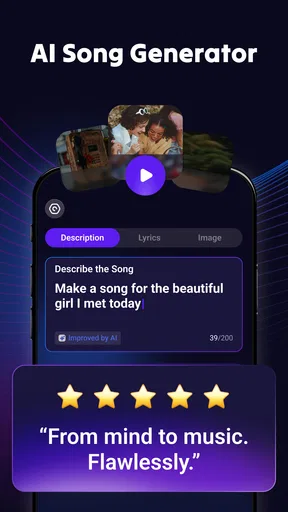
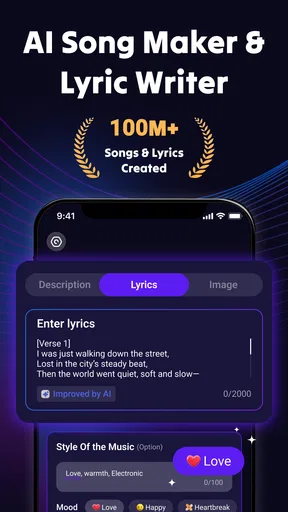
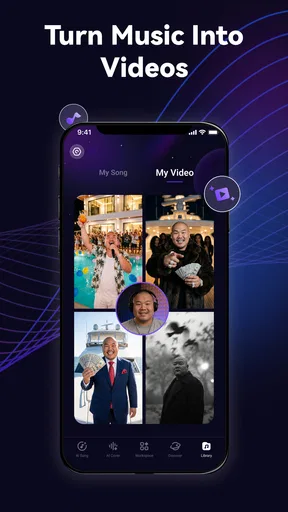

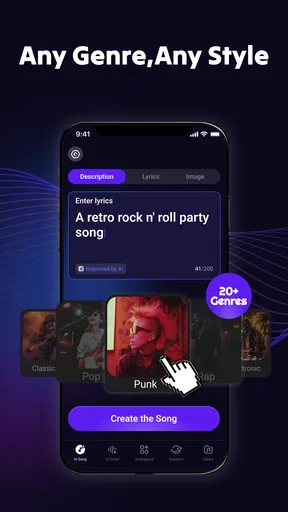
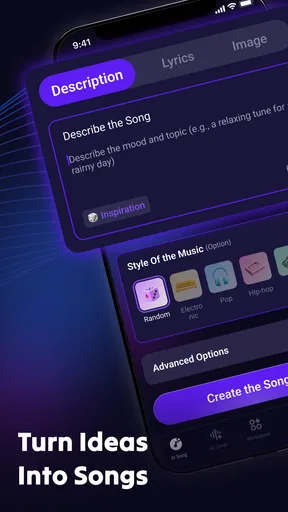
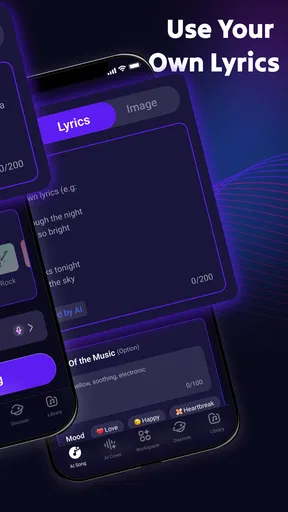
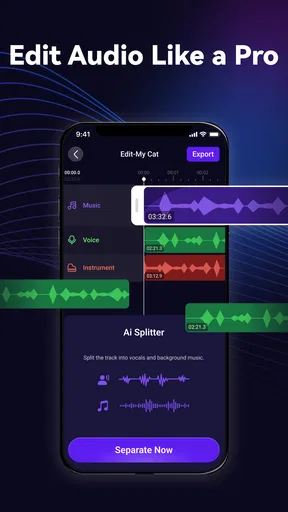
Our Review of Rythmix: AI Music & Song Maker
 Analysis by Appyee
I see Rythmix: AI Music & Song Maker as a quick route from a passing musical idea to something you can hear and shape. Its appeal is less about replacing a full recording studio than about making experimentation feel approachable: you can explore AI-assisted song creation and music videos without first learning a complicated production setup. That makes it interesting for curious beginners and playful creators, though anyone expecting precise, hands-on control should keep their expectations measured.
Getting Started with Rythmix
The first thing that caught my eye was the sleek design of the app. It’s not just about looks, though. Rythmix is incredibly intuitive, making it easy for even a novice like me to navigate. Setting up was a breeze. After a quick download and installation, I was ready to explore the musical world.
Exploring the Features
Once you open the app, you’re welcomed by a variety of options. The main menu is divided into sections, each offering unique tools to create your masterpiece. Here’s what I found most exciting:
- AI-Powered Composition: You can simply hum a tune, and the AI will generate a full-fledged song around it. It’s like having a personal composer in your pocket. How cool is that?
- Beat Maker: With a range of beats to choose from, you can mix and match until you find the perfect rhythm. I found myself lost in creating beats for hours!
- Instrument Selection: From guitars to synths, the app offers a plethora of instruments. You can layer them to create rich, complex tracks that sound professionally produced.
Turning a Quick Idea into a Usable Draft
The most useful way I’d approach an AI music app like this is to treat the first result as a sketch, not a finished release. Start with a clear mood or a short vocal idea, then listen for the part that genuinely works: perhaps the rhythm, a melodic turn, or the contrast between sections. Keeping that one strong element in mind gives the next round of experimentation direction instead of turning every choice into guesswork.
That workflow also helps if you are making a short clip for a personal project. I might try a few contrasting musical directions for a birthday montage, a casual social post, or a small video intro, then choose the version that supports the images rather than competes with them. For this kind of task, speed and inspiration matter more than detailed mixing controls. I would still listen through the whole result before sharing it; an appealing opening does not guarantee that every later moment fits the intended mood.
The Artistic Process
Creating music with Rythmix feels like a journey. You start with a simple idea, and the app guides you through the process of building it into a complete song. The AI suggestions are spot-on, offering creative ideas that I wouldn’t have thought of myself.
There’s a handy tutorial section that I found particularly useful. It’s packed with tips and tricks to help you make the most of the app’s features. Whether you’re a beginner or a seasoned musician, there’s something new to learn.
Where AI Helps—and Where It Can Get in the Way
AI generation is strongest as a way to overcome the blank-page problem. If I have a vague idea but no arrangement, a generated starting point can reveal possibilities I would not have considered. It is less dependable as a substitute for deliberate songwriting: when a melody, lyric, or exact structure matters, I would want the ability to revise every detail and make intentional production decisions. The trade-off is convenience for control.
A practical tip is to change one creative variable at a time. If a result feels wrong, decide whether the problem is the energy, vocal character, or overall style before starting another attempt. That makes comparisons more useful and helps you notice what you actually prefer. It also avoids the common trap of generating many versions quickly, then struggling to remember why one sounded better than another.
The app’s music-video angle makes it more than a conventional beat-making tool, but it also means creators should think about the final destination early. A track intended to sit under spoken commentary needs a different role from one meant to carry a short visual on its own. I would preview the music alongside the intended images and check that the two feel coherent before treating the result as ready to post.
How It Fits Among Music Apps
Compared with a traditional digital audio workstation, an AI-first creation app is appealing when you want a fast idea without assembling a project from scratch. A DAW is usually the better fit for editing individual notes, recording multiple takes, shaping a detailed arrangement, and polishing a mix with precision. Compared with a simple loop or beat app, Rythmix’s generative approach can offer a broader starting point, but a loop-focused tool may be easier when all you need is a predictable backing track.
So I would choose based on the job, not on which app sounds more advanced. For a playful draft, an experimental rap idea, or a music-led clip, Rythmix is the more inviting place to begin. For a commissioned piece with strict timing, a carefully composed song, or work that must be revised repeatedly, a conventional production setup is likely the safer choice. The two approaches can complement each other: use AI to find a direction, then move to more controlled tools if the idea deserves detailed refinement.
Who Will Get the Most from It
I’d recommend trying it if you are new to making music, enjoy testing styles, or want a low-friction way to turn a casual idea into an audio draft. It may also suit someone who creates visual posts and wants to explore music and video as part of the same creative process. You do not need to approach it as a serious musician to find value in it; curiosity and willingness to experiment are enough.
On the other hand, I would steer experienced producers toward tools with transparent editing and deeper control if those are essential to their workflow. I would also hesitate to recommend it to someone who wants a guaranteed, ready-to-publish track on the first try. Generative results can be inspiring, but choosing, judging, and refining them still takes attention. The best experience comes when you see the app as a creative partner for possibilities, not as an automatic quality guarantee.
Sharing Your Creations
Once you’ve crafted your masterpiece, sharing is a piece of cake. Rythmix allows you to export your tracks in various formats. You can share directly to social media platforms or keep them saved for your own listening pleasure. The app even has a community feature where you can collaborate with other users. It’s a fantastic way to get feedback and improve your skills.
Cost, Compatibility, and a Few Sensible Checks
The app is free to download, with optional in-app purchases listed from $5.99 to $99.99 per item, so I’d explore the free experience before deciding whether any paid option suits your needs. It is rated for Everyone, and the current release is version 1.12.5. Android users need version 6.0 or later. The developer is PROMINENT FORTUNE PTE. LTD.; the app sits in the music and audio category.
Before building a project around a generated track, I’d check what the app currently lets me save or export and whether the available options fit the platform where I plan to use it. I would also review any purchase prompts carefully rather than assuming every creation path is included at no cost. These small checks matter most if you are making something for a deadline or intend to use the result beyond personal experimentation.
A realistic everyday use would be a commute idea that turns into a short creative session later: hum a phrase into the app, explore a few directions when you have time, and keep the strongest draft for a personal clip. I would not count on finishing a polished song in one sitting, but that is not the point. The value is having a convenient place to test a thought before it disappears.
My Personal Take
As someone who has always been passionate about music but never had the tools or skills to create it, Rythmix was a game-changer. The app doesn’t just help you create music; it inspires you to explore new ideas and push creative boundaries. It’s perfect for anyone looking to delve into the world of music production without investing in expensive equipment or software.
The AI component is particularly impressive. It feels like having a mentor guiding you through each step. The app’s ability to transform a simple hum into a full track is nothing short of magical. Plus, the community aspect adds a social element that makes the whole experience more engaging.
That creative invitation is backed by a sizable audience: it has more than a million installs and an average rating of 4.0 from around 22,000 ratings, alongside 354 written reviews. I take those figures as signs that plenty of people are willing to try the concept, not proof that every output will suit every listener. What matters more to me is whether the process helps you make something you enjoy, and that depends on how much you value speed and surprise over exact control.
A Clear Verdict for Curious Creators
In conclusion, Rythmix: AI Music & Song Maker is a must-try for aspiring musicians or anyone interested in music creation. It’s user-friendly, packed with features, and offers endless creative possibilities. So, if you’ve ever wanted to turn your musical ideas into reality, give Rythmix a try. Who knows? You might just create the next big hit!
My more grounded recommendation is to try it for exploration: use a hum or an initial concept to get unstuck, compare a few directions thoughtfully, and decide whether the result works for your own purpose. If you need meticulous editing or predictable, professional finishing, pair that curiosity with a more controllable production tool. For casual creators and beginners who want to hear an idea take shape without a steep learning curve, the app offers a genuinely appealing starting point.
Verdict
Strengths of Rythmix: AI Music & Song Maker
- User-friendly interface for easy navigation.
- Wide range of AI-generated music styles.
- Allows quick song sharing on social media.
- Regular updates with new features.
- Supports high-quality audio exports.
Limitations of Rythmix: AI Music & Song Maker
- Limited free version features.
- Occasional lag on older devices.
- Requires internet for full functionality.
- Subscription cost can be high.
- In-app ads in the free version.
Similar Picks in This Category
View All
YouTube Music
Google LLC4.4

Samsung Music
Samsung Electronics Co., Ltd.3.8

Spotify: Music and Podcasts
Spotify AB4.3

JioSaavn - Music & Podcasts
Saavn Media Limited4.3

Lark Player:Music Player & MP3
Lark Player Studio - Music, MP3 & Video Player4.6

StarMaker: Sing Karaoke Songs
SKYWORK AI PTE. LTD.4.3
Frequently Asked Questions
What is the main functionality of Rythmix: AI Music & Song Maker?
Rythmix: AI Music & Song Maker is an innovative app designed to assist users in creating music seamlessly. Utilizing advanced AI technology, it allows users to generate melodies, beats, and full compositions without requiring extensive musical knowledge. It offers a variety of tools for both beginners and experienced musicians to explore their creativity.
Is Rythmix suitable for beginners with no music production experience?
Yes, Rythmix is designed to be user-friendly for beginners. Its intuitive interface and AI-driven features simplify the music creation process, allowing users to produce high-quality tracks without prior experience. The app includes tutorials and guided steps to help new users get started and develop their music-making skills.
Can I export my creations from Rythmix to other platforms?
Absolutely. Rythmix provides users with the option to export their music creations in various formats compatible with other platforms. This functionality enables users to share their music on social media, collaborate with other artists, or import their tracks into professional music production software for further editing.
Does Rythmix offer in-app purchases or subscriptions?
Rythmix operates on a freemium model, offering basic features for free while providing additional premium features through in-app purchases. These may include expanded sound libraries, advanced editing tools, and ad-free experiences. Users can choose to subscribe or make one-time purchases depending on their needs and preferences.
What platforms is Rythmix available on, and are there any system requirements?
Rythmix is available for both Android and iOS devices. It requires a minimum operating system of Android 8.0 or iOS 12.0 to ensure optimal performance. Users should check for updates regularly to access the latest features and improvements. It's recommended to have sufficient storage space for downloading additional sound packs and saving projects.
